
Your schedule and multi-sport setup
Most of us don't do just one thing. You might lift twice a week, play five-a-side on a Thursday, and cycle at the weekend. Strathlon is built for that. You tell it which sports you do and put them in order. Your schedule and your calorie targets take them into account, and your workout plan adds gym work for your top two sports too†.
My Schedule & Sport
On the Plan tab, My Schedule & Sport shows the day's sport sessions, and its Edit schedule button sets your weekly gym rotation and the days each sport's matches and practices fall on. The sports themselves live in Settings → Sport Settings: that's where you add the sports you actually do and put them in order, and the first one is your primary sport. It's worth a minute of your time: your schedule and your calorie targets follow these sports and, when Sports Performance is one of your goals, your workout plan uses their order to choose gym work that supports what you play.
- Pick your sports. Add everything you take seriously, not just the main one.
- Set a primary. With Sports Performance as one of your goals, this is the sport your workout plan leans towards when it has to choose.
- Reorder them. Use the arrows beside each sport under Sport priority. Order signals priority, so put them in the order they matter to you.
The schedule knows what season it is
Sports come and go through the year, and your schedule should too. Each sport has a season, which you can change or set to year-round, and outside it the sport simply drops off this week's schedule, automatically. The idea is that the week only ever shows what's relevant right now, rather than listing everything and leaving you to mentally cross things out. When its season comes back around, the sport slots straight back in.
Log a class, a walk, or anything else
Not everything happens in a structured gym session. From the Plan tab, tap Add activity to log a gym class from dozens of class types, a walk, or any activity you've done. The app estimates the calorie burn for you and adds it in, so your day reflects what you actually did without you having to do the sums.
Doing a workout
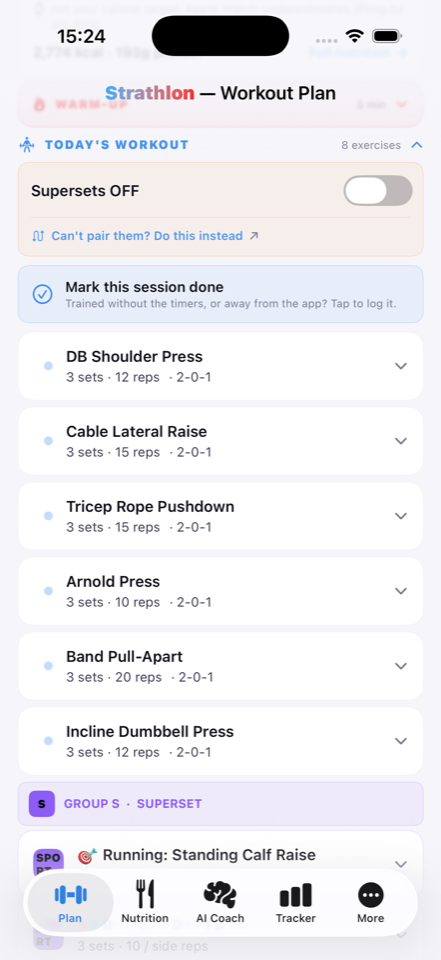
When it's time to train, open today's session and the app walks you through it. You get a warm-up first, then your exercises with everything you need to keep moving:
- Set tracking so you can tick off each set as you go.
- Rest timers between sets, so you're not watching the clock yourself.
- Supersets and tri-sets grouped together the way they're meant to be done.
- HIIT with work and rest intervals timed for you.
When you're finished, mark the session done. Tapped it by mistake, or didn't really finish? You can undo it: nothing is set in stone.
Heading away? Take a proper break
Life happens, and a week off shouldn't feel like failure. If you're going on holiday or just stepping back for a bit, mark a break. The app pauses its expectations, shades your charts across the dates you're away so a dip doesn't look like backsliding, and welcomes you back with a gentle catch-up rather than a guilt trip. It's there to keep you going for the long run. A quiet week isn't something to be punished for.
Want to understand how your workout plan actually changes for the sports you pick? Read Your workout plan should know your sport. And for a walk through every part of the app, the user guide has you covered.
← All articles · Your workout plan should know your sport · User guide · Home