
Training and eating with your cycle
Your body doesn't respond the same way every week of the month, so Strathlon can take your menstrual cycle into account*. It does this through four separate switches, so you use only the parts that suit you and leave the rest alone.
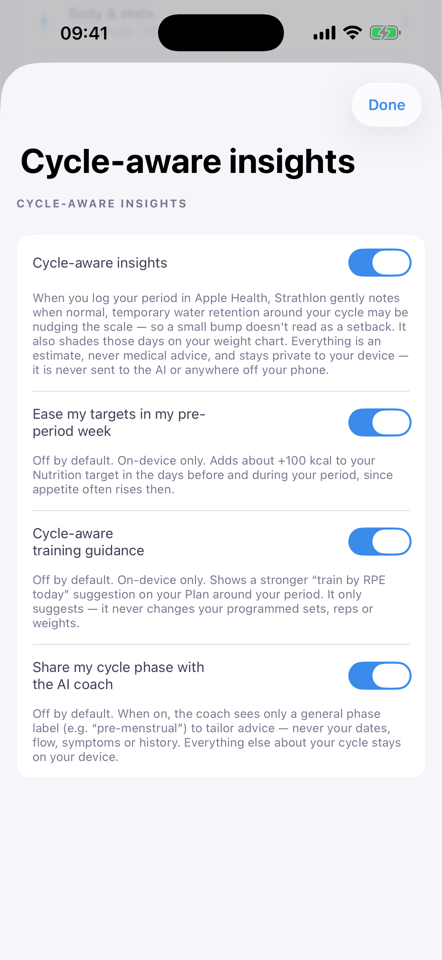
Four switches, all in your control
In Settings → Cycle-aware insights you'll find four switches. They're separate on purpose: each one does its own thing. Cycle-aware insights is on unless you switch it off, and the other three are off until you switch them on and work only while it's on:
- Cycle-aware insights. Adds calm, plain-English notes: one on your weight when normal water retention around your period may be nudging the scale (those days are also shaded on your weight chart), one on the Nutrition tab about eating around your period, and one on the Plan tab about training by feel.
- Ease my targets in my pre-period week. Adds about 100 kcal to your calorie target in the days before and during your period, since appetite often rises then.
- Cycle-aware training guidance. In those same days, the note on your Plan tab adds a stronger suggestion: train by effort (RPE), and drop the last set of each lift if your energy is low. It only suggests: your programmed sets, reps and weights stay as they are.
- Share my cycle phase with the AI coach. Lets your AI Coach factor in your current phase when it gives advice.
Turn on all four, one of them, or none. Whatever you pick, you can change it again at any time.
How it adapts to you
As you move through your cycle, Strathlon offers guidance and, if you ask it to, changes one number. The guidance is the notes above, with the stronger training suggestion if you've switched it on. The number is your calorie target: with the ease on, it rises by about 100 kcal in the days before and during your period. Your training stays as programmed, and you decide how to act on the notes.
All of this works from the periods you log in Apple Health, once you allow Strathlon to read them. The more consistently you log, the better it can line things up with where you actually are.
What your cycle data is used for
This is the part that matters most. The period dates and flow you log in Apple Health are used on your device, to work out the adjustments described above. What can and can't move off your phone is set out in full on our Privacy page (section 4A).
Two things can reach your AI coach, and only because you asked them to. The first is the general phase word: switch on Share my cycle phase with the AI coach and your coach is told something like "pre-menstrual": one word, never a date, a flow level, a symptom or your history.
The second is easy to miss, so we'd rather say it plainly. If you switch on the pre-period ease (the option that adds about 100 kcal to your target in the days before and during your period), then your coach sees that adjusted target, because it's the same target the rest of the app is showing you. It also gets a short note saying the target was deliberately adjusted, so it doesn't read the extra calories as a slip and try to correct you. What it does not get is the reason, unless you've also switched on the phase share above.
So: with both switched off, neither of those two things is sent. With them on, it's a phase word and a calorie number. Your diary stays out of it.
If you'd like the reasoning behind all of this (why training and nutrition can benefit from moving with your cycle rather than ignoring it), read our science explainer, training with your cycle.
← All articles · The science: training with your cycle · Privacy · Home