
Getting the most out of your AI Coach
The single biggest thing to know about your AI Coach is this: before you type a word, it already knows your profile, your goals, your sport if you play one, your full training programme, today's exact exercises and the macros you've eaten so far. That changes the kind of questions worth asking.
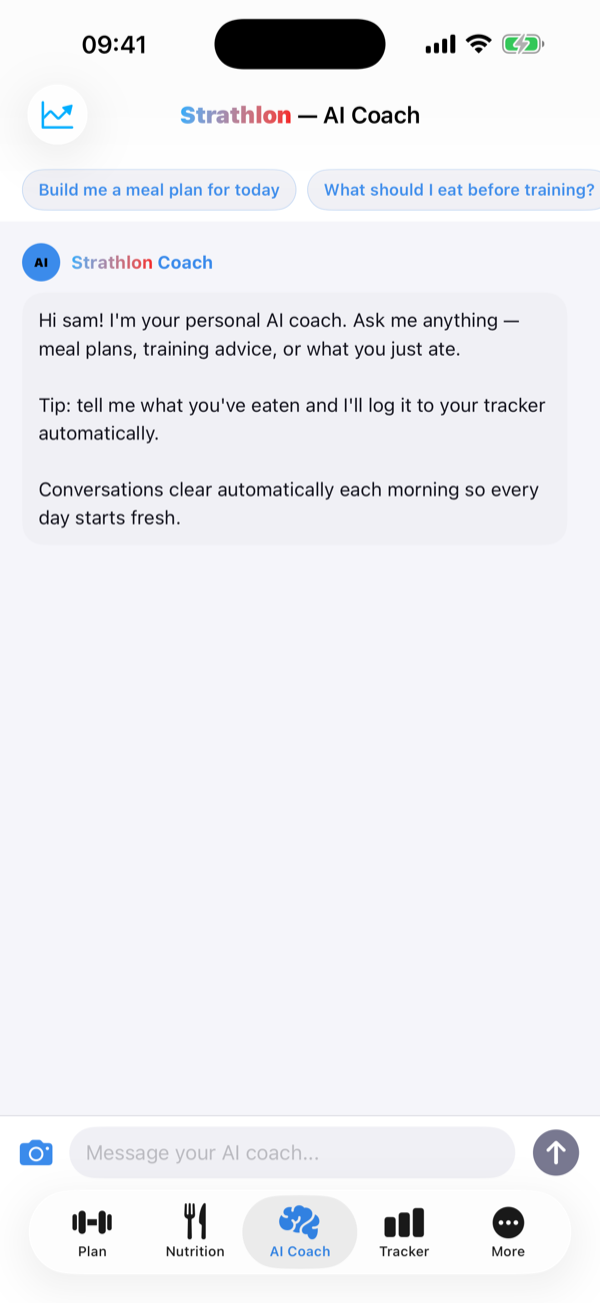
What your coach already knows
When you open the AI Coach, it reads live from the rest of the app:
- Your workout plan, end to end. Every phase of your programme, where you are in it, and the actual exercises you're scheduled to do today.
- Today's nutrition. Your calorie and macro targets for the type of day it is (training, rest, match or sport), and what you've already logged in your Tracker.
- How you're tracking. Your progress to date, so it can tell whether you're ahead, on pace, or drifting.
Two permissions are worth keeping separate here. Strathlon can read your weight from Apple Health on your device to keep your targets current. That uses Apple Health's own read permission, and on its own it sends nothing anywhere. Whether your coach sees your weight and body data is a separate switch: "Share my health data with the AI coach" (Settings → App settings → Privacy & your data), off by default. Leave that off and those figures stay on your phone. The coach simply works from what you type and your in-app profile, even while your on-device targets keep following your latest weight.
Prompts that actually pull their weight
Because the coach has your context, vague questions get specific answers. Try things like:
- "Give me a high-protein dinner that fits what's left of today's macros."
- "I'm short on time tonight, can you swap today's session for a 25-minute version?"
- "How should I warm up for today's lower-body session?"
- "Build me a three-day meal plan for a training week, around 2,200 kcal a day."
- "What's a good pre-match breakfast if I play at 11am?"
A couple of habits make a real difference. Ask in plain language: you don't need to feed it numbers it already has. And if it asks you a clarifying question, answer it: the coach is designed to ask before it guesses, so a quick reply gets you a much better answer than forcing it to assume.
Snap your meal instead of typing it
Logging food is faster with a photo. Take a picture of your plate and the coach estimates the calories, protein, carbs and fat, then offers to add it straight to your Tracker: any day, any meal slot. It shows you what it read first, so you can adjust a portion before you save. Prefer words? Just describe what you ate ("two scrambled eggs on sourdough and a flat white") and it does the same. Nothing is logged without you confirming it.
Ask the coach about predicted vs actual weight
Over time your predicted weight (from your tracked calorie deficit) and your actual scale weight can drift apart. That's normal: water and glycogen make real weight drop faster at first, then your body adapts and the prediction runs ahead. When the two lines diverge on the Body weight chart in the Progress tab, the Predicted vs actual figure under the chart shows how far apart they are. Tap "Ask the coach about this" below it and the coach's answer appears right there, with your numbers already loaded. Rather than guessing, it looks at things like how many days you logged food and your weigh-in consistency, then usually asks you a question or two before suggesting what's going on. Tap Continue in the coach to answer and keep going in the AI Coach tab.